
Segmenting Users for Onboarding: Best Practices
Segment users into 2–3 onboarding paths, tailor support and milestones, and measure activation, TTFV, completion, and retention.

Justin Britten
If I onboard every user the same way, I slow people down. The fix is simple: I start with 2–3 user segments, route each one into a different path, and track activation, time-to-first-value (TTFV), completion, and retention by segment.
Here’s the whole article in plain English:
- I only segment users when the path should change
- I segment by things like role, use case, company size, technical comfort, acquisition source, and first-session behavior
- I collect 1–2 signup answers to route users early, then confirm the segment after a second action
- I give each segment its own activation event and onboarding milestones
- I match support to the segment:
- Self-serve for SMBs, B2C, freelancers, and cold leads
- High-touch for enterprise and high-LTV accounts
- I keep tool data aligned across CRM, analytics, onboarding tools, email, and referral or waitlist systems for your product launch
- I watch for key numbers like:
- 40%–50% activation within 7 days
- first meaningful action within 30 minutes for beta users
- email open rates below 35% as a sign the sequence needs work
- waitlist decay of 20%–30% per month without updates
A simple way to think about it: segment less, route better, measure by group, and fix the step where people stall.
| Area | What I focus on |
|---|---|
| Segment setup | Start with 2–3 clear groups |
| Routing | Use signup answers plus behavior |
| Flow design | Set different milestones and messages |
| Support model | Self-serve vs. guided help |
| Systems | Keep segment rules the same across tools |
| Metrics | Activation, TTFV, completion, retention |
If I do that, onboarding becomes easier to follow for users - and easier to improve for my team.
Choose Segmentation Criteria That Actually Change the Onboarding Path
Pick criteria only when they change what happens next in onboarding.
Segment by Role, Use Case, Company Size, and Technical Comfort
Start with details that affect setup, support, or the kind of guidance someone needs. Good starting points include role, company size, and technical comfort.
| Attribute | Impact on Onboarding Path | Why It Matters |
|---|---|---|
| Role | Permissions & setup | Admins need configuration; end users need feature training. |
| Company Size | Support level | Enterprise needs high-touch; SMBs need self-serve efficiency. |
| Technical Comfort | Documentation & UI | Developers need API docs; non-technical users need UI walkthroughs. |
This is where segmentation starts to pay off. An admin usually needs help with account setup, permissions, and initial config. An end user, by contrast, often just wants to get in, learn the main features, and start using the product without friction.
The same idea applies to company size. A large enterprise account may need hands-on support and a more guided rollout. A smaller business usually wants a fast, self-serve path that gets them to value without extra steps.
Technical comfort also changes what good onboarding looks like. Developers tend to want API docs, code samples, and direct access to technical setup. Non-technical users often do better with product tours, plain-language instructions, and UI walkthroughs.
Factor In Acquisition Source and First-Session Behavior
Where a user comes from can tell you a lot about intent. Someone who signed up after a colleague referred them already has a basic level of trust in the product. They usually don't need much convincing before they get started.
A user from a paid campaign is different. They may be comparing several tools at once, so the onboarding flow needs to show value fast and remove doubt early.
First-session behavior can be just as useful. What someone clicks, skips, or completes in that first visit gives you clues about what they need next. That lets you trigger the right step at the right time instead of forcing every user through the same straight-line checklist.
Start with a Small Number of Clear Segments
Keep it simple at the start. Use 1–2 qualifying questions at signup to route users, then confirm the segment after a meaningful second action.
Once you've confirmed the segment, send the user into a distinct onboarding path. That's the point: not more segments for the sake of it, but clearer paths that match what people are trying to do.
Design Onboarding Flows for Each Segment
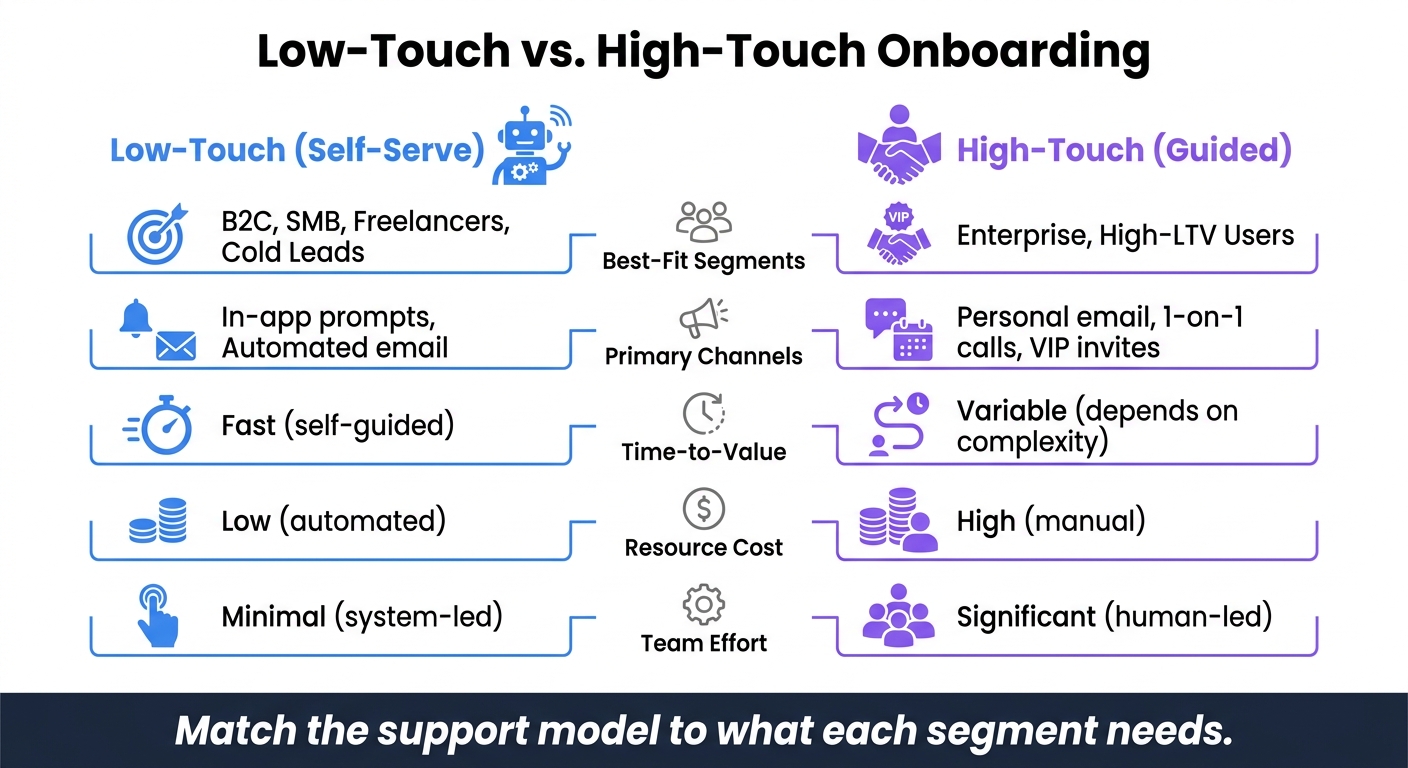
Low-Touch vs. High-Touch Onboarding: Which Model Fits Your User Segments?
Use the segment criteria from the previous step to decide what users see next. Segmentation only works when it changes the path. That means each segment needs its own milestones, messaging, and level of support.
Define Activation Events and Milestones for Each Segment
Each segment reaches first value in a different way. So don’t treat activation as one single moment for everyone.
Map each segment to its own activation event, then shape the onboarding flow around helping users get there as fast as possible. Once that’s clear, send each segment the email sequence tied to that activation event.
Balance Low-Touch and High-Touch Onboarding
After you set the activation path, match the support level to the segment. Not every user needs the same kind of help.
Smaller accounts, freelancers, and B2C users often do best with a fast, self-serve path. Think automated prompts and email nudges that keep them moving without someone on your team stepping in.
Enterprise accounts and high-LTV users usually need more hands-on help. That can mean a personal email, 1-on-1 calls, or VIP invites. It takes more effort, but for these users, that extra attention can make all the difference.
| Feature | Low-Touch (Self-Serve) | High-Touch (Guided) |
|---|---|---|
| Best-Fit Segments | B2C, SMB, freelancers, cold leads | Enterprise, high-LTV users |
| Primary Channels | In-app prompts, automated email | Personal email, 1-on-1 calls, VIP invites |
| Time-to-Value | Fast (self-guided) | Variable (depends on complexity) |
| Resource Cost | Low (automated) | High (manual) |
| Team Effort | Minimal (system-led) | Significant (human-led) |
The goal is simple: match the support model to what each segment needs.
Collect Segment Data at Signup and Before Launch
Routing falls apart if you don’t collect the right data early. The easiest way to sort users well is to ask for an email plus one qualifying data point at signup - role, use case, or company size.
For prelaunch products, Prefinery can collect signup data through a viral waitlist and route users into the right onboarding flow when access opens. Before you scale those routing rules, confirm the segment with a second action.
Set Up Segmented Onboarding Across Tools and Workflows
Segmentation falls apart when every tool uses its own version of the truth. Your product, CRM, email platform, and analytics setup need to work from the same segment definitions. Then those definitions need to become actual routing rules and triggers.
Define Routing Rules, Data Fields, and Segment Logic
Before you touch a single tool setting, document your segment definitions. Spell out what makes someone an "enterprise" user versus an "SMB" user. That might be based on firmographics, role, use case, or company size. Just as important, assign one owner to each rule across product, marketing, and success. If nobody owns the rule, it tends to drift, and handoffs start to crack.
Once those definitions are locked in, set up one standard status flow across your stack: applied → invited → active. Each status change should trigger the right next step, like an email sequence or an in-app flow. Use webhooks or API syncs so systems stay aligned when a status changes.
Route users by fit signals, like ICP match, role, or use case, not signup date.
Connect Onboarding Tools, Analytics, and Referral Systems
Your onboarding stack works best when each tool does its job and passes data cleanly to the next one. In-app onboarding tools like Appcues or Pendo can deliver segment-based checklists and product tours. They should get segment logic from your analytics layer. Tools like Amplitude or Mixpanel track feature usage, session frequency, and "aha" moments, which helps you spot where each segment gets stuck.
Your CRM should stay the source of truth for account-level data, while your marketing automation tool triggers lifecycle sequences based on segment status.
For referral-led and waitlist cohorts, Prefinery can pass pre-launch data into your onboarding stack. When systems stay in sync, you can measure each segment the same way.
Map System Roles and Data Ownership
A clear ownership map helps you avoid data conflicts as the team grows. Here’s how each system fits into a segmented onboarding setup:
| System Type | Data Owned | Role in Segmented Onboarding |
|---|---|---|
| CRM (e.g., HubSpot, Intercom) | Firmographics, lifecycle status, revenue | Source of truth for account-level routing |
| Analytics (e.g., Amplitude, Mixpanel) | Feature usage, session frequency, "aha" moments | Identifies behavioral segments and friction points |
| Onboarding Software (e.g., Appcues, Pendo) | In-app progress, checklist completion | Delivers segment-specific tutorials and flows |
| Viral Waitlist/Referral (e.g., Prefinery) | Referral count, waitlist position, high-intent signals | Manages pre-launch and early-access cohorts |
| Marketing Automation (e.g., Intercom, Loops) | Email engagement, lifecycle stage | Triggers segment-specific nurture sequences |
Measure Results by Segment and Refine Over Time
Once routing is live across your stack, look at performance by segment to see where people get stuck.
Track Activation, Time-to-First-Value, Completion, and Retention
Split your core metrics by segment: activation, time-to-first-value (TTFV), onboarding completion rate, and retention. A good benchmark is 40% to 50% activation within 7 days. For beta cohorts, aim for the first meaningful action within 30 minutes. If it takes longer, that usually points to setup issues or weak guidance.
For referral-led cohorts, track referral participation too. That helps you see whether that segment is not just converting, but also taking part and sticking around.
Compare Cohorts and Find Friction Points
Put segments side by side by role, company size, acquisition source, and referral cohort. This makes weak spots easier to spot.
If invite click-through is strong but trial-to-paid conversion is weak, the problem is probably in onboarding or pricing. If a segment’s sequence open rate falls below 35%, your cadence may be too fast or too slow.
Use these signals to match the problem to the fix:
| Problem | Likely Cause | Fix |
|---|---|---|
| Low completion rate | Too many setup steps or long surveys | Shorten surveys; move non-essential fields to post-activation |
| Slow activation (high TTFV) | Lack of guidance or technical hurdles | Add live support; offer white-glove onboarding for high-LTV accounts |
| High drop-off at signup | Unclear value proposition | Simplify the landing page to one focused message and CTA |
| Low sequence open rate | Cadence too aggressive or content too sparse | Adjust the cadence and add more relevant content |
For pre-launch segments, keep an eye on waitlist decay. Without regular updates, waitlist quality can fall by 20% to 30% per month. That’s a clear sign to adjust your communication cadence before access opens.
Conclusion: Start Small, Personalize What Matters, and Iterate
Start with two or three segments that have clearly different onboarding needs. Set one clear activation goal for each, then make sure users are routed the same way across your tools.
When a segment underperforms, fix the point where users stall. If high-LTV accounts need extra help, add it. Then use what you learn to update routing, support, and messaging.
FAQs
How do I choose my first user segments?
Start with the data points that map straight to your goal. That usually means things like user role, main use case, or company size. Your first segments should be simple and easy to act on, such as lifecycle stage, behavior, or firmographic traits.
For example, you might group users by referral activity, engagement level, or product milestones. In Prefinery, you can set this up with dashboard search filters, and your segments update in real time as user data changes.
When should I use self-serve vs. high-touch onboarding?
Self-serve onboarding works best when users want a smooth, independent path to their first aha moment. It tends to fit standardized products, where people can sign up, look around, and get value without needing much help.
High-touch onboarding makes more sense for complex products or enterprise customers that need more personal guidance to see what the product can do for them. This is where behavioral segmentation comes in handy. It helps you spot which users are doing fine on their own and which ones may need extra support.
What if a user fits more than one segment?
A user can belong to more than one segment at the same time. Platforms like Prefinery use dynamic, rule-based segmentation, which means a user’s status updates in real time as their behavior or data changes.
That matters because people don’t stay still. Someone might refer a friend, open an email, click a link, and hit a signup milestone all in the same week. As that happens, the platform keeps that person grouped by their latest activity, so you can send messaging that fits what they just did, without having to manage lists by hand.